Seedance 2.5 · OpenArt
Tesla ramp trend: launch your product
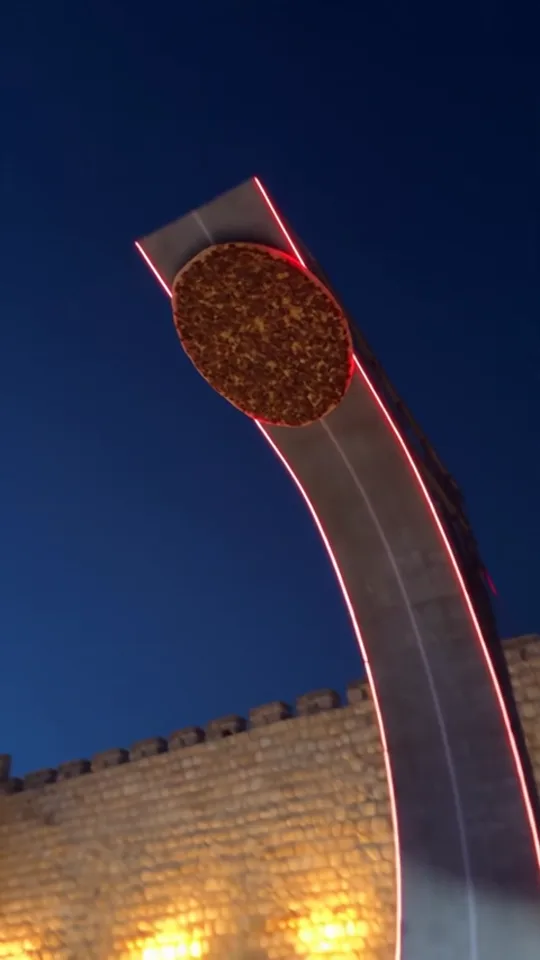
The Tesla stunt everyone is talking about: the car climbs a giant ramp, flips in the air and lands in smoke on thruster jets. Put your own product in place of the car. One product photo and one prompt is all it takes. Café, boutique or shoe store, it works for any business. 12 seconds with Seedance 2.5 on OpenArt.
Source files
Download the files and upload them straight to the generator.
- Download
Motion source video (12 s)
MP4 · 2 MB
- Tool
- OpenArt
- Model
- Seedance 2.5
- Input
- 1 video + 1 product photo
- Length · Ratio
- 12 s · 9:16
- Cost
- 12 s 480p ≈ 950 credits
- You change
- [PRODUCT]
How-to video
Step by step
Prepare the video and your product photo
Download the motion source video below. Pick a clear photo where your product is shown on its own. Its logo and text carry straight into the video.
Open Seedance 2.5
On the OpenArt home page, tap the Seedance 2.5 card under What's New → Create Now. Use Add reference to upload the video first, then your product photo; they become @video1 and @image1.
Paste the prompt
Copy the template and replace every [PRODUCT] with your product's name (e.g. the sneaker, the coffee cup, the perfume bottle). After pasting, delete @video1 and @image1 and re-select them by typing @; plain text won't link to the references.
Generate
Output: 9:16, 480p, 12 s. If you like it, run the same prompt at 720p.
Prompt template · replace [PRODUCT]
Use @video1 as the PRIMARY motion, camera movement, scene composition, timing and action reference.
Replace ONLY the white sports car in @video1 with [PRODUCT] shown in @image1, enlarged to the size of the car.
[PRODUCT] itself performs every action of the car, as if it were the car: it rolls out, drives up the giant curved red-edged ramp, races up the vertical wall, launches off the top, flips in the sky with the white thruster jets, hovers down and lands in the white smoke among the orange cones.
There is NO car anywhere: no car body, no wheels, no windows, no headlights. [PRODUCT] does not sit on a car and never turns into a car.
Keep the exact look of [PRODUCT] from @image1 in every frame: same shape, colors, details, and any logo or text exactly as on the product.
Keep the original camera movement, the ramp, the old stone city wall, the sky, the cones, the smoke, the crowd and the environment from @video1.
Maintain the original 12-second sequence and timing. Photorealistic, 9:16 vertical video. No camera cuts. No added captions or watermarks.
Example · the exact prompt I used in this video (lahmacun)
Use the template above for your own product; this example shows it filled in.
Use @video1 as the PRIMARY motion, camera movement, scene composition, timing and action reference.
Replace ONLY the white sports car in @video1 with the lahmacun shown in @image1, enlarged to the size of the car.
The lahmacun itself performs every action of the car, as if it were the car: it rolls out, drives up the giant curved red-edged ramp, races up the vertical wall, launches off the top, flips in the sky with the white thruster jets, hovers down and lands in the white smoke among the orange cones.
There is NO car anywhere: no car body, no wheels, no windows, no headlights. The lahmacun does not sit on a car and never turns into a car.
Keep the lahmacun's exact look from @image1 in every frame: same shape, colors, details, and any logo or text exactly as on the product.
Keep the original camera movement, the ramp, the old stone city wall, the sky, the cones, the smoke, the crowd and the environment from @video1.
Maintain the original 12-second sequence and timing. Photorealistic, 9:16 vertical video. No camera cuts. No added captions or watermarks.
Image upload order
- Image 1Tesla ramp clip (@video1)
- Image 2Your product photo (@image1)
Tips
Explicitly forbid the car
If you only say "replace the car with the product", the model puts the product on top of the car. The lines "no car body, no wheels" and "the product behaves as if it were the car" prevent that.
Take the scene from the video
Describing the ramp and the location in words makes the model change the scene; in one test the product teleported into a stadium. The reference video locks the camera, the ramp and the location.
Use a clean product photo
A simple background with the whole product visible works best. If there are other things on the plate, say in the prompt that you only want the product.
Some links on this page are affiliate links.