Seedance 2.5 · OpenArt
Trend football video: with your own character
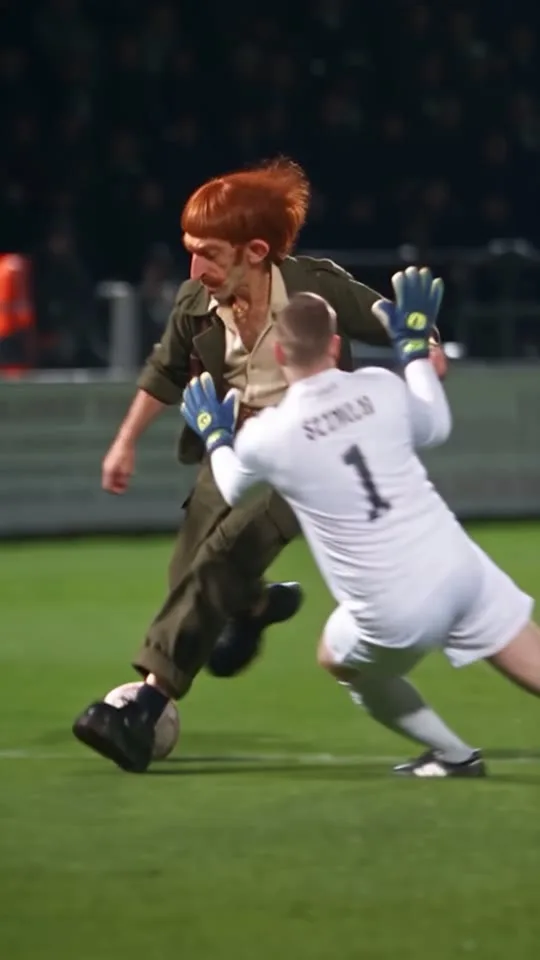
Swap the man dribbling past the goalkeeper for your own character. A single-prompt character swap with Seedance 2.5 on OpenArt: the moves, camera and stadium stay, only the person changes.
Source files
Download the files and upload them straight to the generator.
- Download
Motion source video (15 s)
MP4 · 2.9 MB
- Tool
- OpenArt
- Model
- Seedance 2.5
- Input
- 1 video (≤15 s) + 1 character image
- Length · Ratio
- 15 s · 9:16
- Cost
- 15 s: 480p ≈ 1,055 · 720p ≈ 2,280 credits
How-to video
Step by step
Prepare the clip and your character
Download the motion source video below (or use your own clip of up to 15 seconds where one person is clearly visible). A character sheet showing several angles gives the best result.
Open Seedance 2.5
On the OpenArt home page, tap the Seedance 2.5 card under What's New → Create Now. Use Add reference to upload the video and your character image; they become @video1 and @image1.
Paste the prompt
Copy the template and fill in the brackets. After pasting, delete @video1 and @image1 and re-select them by typing @; plain text won't link to the references.
Generate
Output: 9:16, duration = your video's length (15 s). Test at 480p first, then generate at 720p.
Prompt template · fill in the brackets
Use @video1 as the PRIMARY motion, camera movement, scene composition, timing and action reference.
Replace ONLY [the person to replace, described by outfit, e.g. "the bald man in the black leather jacket"] in @video1 with the exact character shown in @image1.
Use @image1 for the face and the outfit (if it is a character sheet: close-up panels for the face, full-body panels for the outfit).
STRICT CHARACTER IDENTITY LOCK: [describe YOUR character: hair, face, distinctive features, build, age]. Outfit: [list the outfit piece by piece].
Reproduce the original performance from @video1 as closely as possible: body movements and timing.
Keep the original camera movement, the other people and the environment.
Do not keep the original face. Do not blend the two faces. Do not show multiple copies of the character.
Ultra-photorealistic, natural motion, 9:16 vertical video. No camera cuts. No facial distortion.
Example · the exact prompt I used in this video
Use the template above for your own character; this example shows it filled in.
Use @video1 as the PRIMARY motion, camera movement, scene composition, timing and action reference.
Replace ONLY the bald man with the thick black moustache who wears a black leather jacket over a grey plaid shirt and grey trousers, the man dribbling the ball past the goalkeeper and the green-shirted players in @video1, with the exact man shown in @image1.
@image1 is a character sheet of one single man and defines his identity and outfit. Use its large portrait and close-up face panels for the face. Use its full-body panels for the outfit and body proportions.
STRICT CHARACTER IDENTITY LOCK:
Preserve the man's exact identity from @image1: copper-orange bowl-cut hair with a straight fringe, very large pink protruding ears, long narrow face with deep wrinkles, thick copper curled moustache, bushy copper eyebrows, gap between his front teeth, pale freckled skin, thin wiry build and age. Keep this identity consistent in every frame of the single continuous tracking shot.
He wears the exact outfit from @image1: olive-green work jacket with rolled sleeves, cream shirt open at the collar, thin gold chain with round pendant, brown leather suspenders, brown belt with brass buckle, baggy olive cargo trousers rolled at the ankle, black chunky leather shoes. No cigar.
Reproduce the original man's performance from @video1 as closely as possible: body movements, ball touches, dribbling, feints, footwork, the kick and the timing. Preserve the exact football choreography.
Preserve the original camera movement, the goalkeeper in white, the green-shirted players, the ball, the night stadium, the floodlights, the steward in the orange vest and the environment.
Maintain the original 15-second sequence and camera perspective.
Do not keep the original man's face, bald head or black moustache. Do not blend his face with the face from @image1. Do not generate a different person. Do not show the character sheet layout or multiple copies of the man. The man must clearly look like the man from @image1 in every visible frame.
Do not redesign the scene. Do not invent new actions. Do not change the camera trajectory or action timing.
Ultra-photorealistic night football match footage, natural motion, consistent facial features, 9:16 vertical video. No camera cuts. No facial distortion.
Image upload order
- Image 1Football clip as motion source (@video1)
- Image 2Your character sheet (@image1)
Tips
Describe the person you replace by their outfit
Don't say "main character"; the model gets confused about who to swap. Write something like "the bald man in the black leather jacket".
List the face and outfit in detail
The image alone isn't enough; words lock the identity: hair, face, distinctive features, build, age and the outfit piece by piece.
Forbid the old face and blending
"Do not keep the original face. Do not blend the two faces." keeps the two faces from mixing.
Don't use "edit" wording
"STRICT VIDEO EDITING TASK / Strictly edit" makes OpenArt reject the job (TaskTypeMismatch). Credits are refunded, but you lose time.
Don't time-tag the face
A line like "the face is large in the first 0–4 s" made the model open with a close-up.
Close, not frame-perfect
The model follows the source closely but not frame by frame; small motion differences are normal. Clips where the face is in a medium or wide shot work best.
Some links on this page are affiliate links.